Law Firm Schema Generator: Free JSON-LD Tool Built for Attorneys
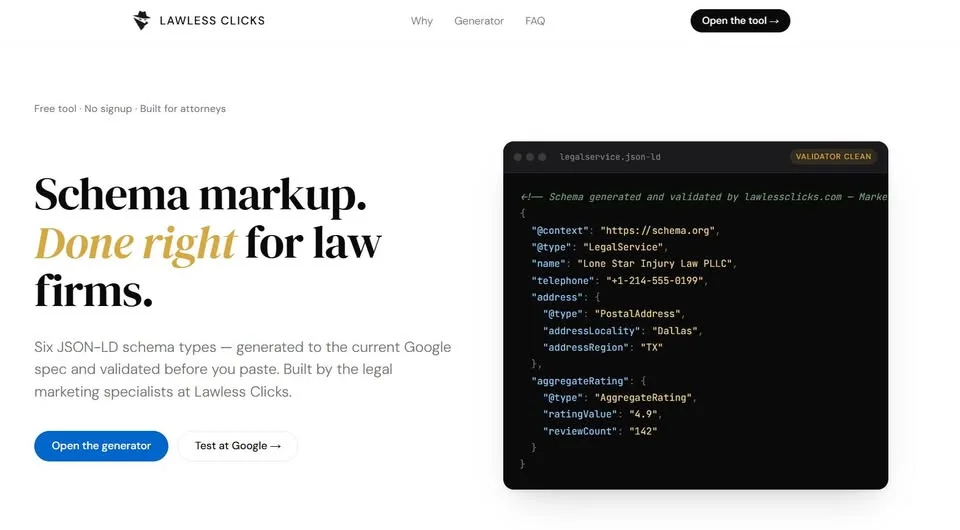
A good law firm schema generator should produce code that actually triggers rich results in Google — not just code that passes a validator. Most of the free tools attorneys try fail that second test. They will happily hand a solo practitioner a block of code that is technically valid and still useless in Google’s eyes. It passes the validator. It renders nothing in search. It tells the AI engines almost nothing about your firm. And the attorney who pasted it — trusting that the green checkmark meant something — has no idea why a competitor keeps showing up in the Perplexity answer box instead.
That is exactly the gap we built our new tool to close. Yesterday we shipped the Lawless Clicks Law Firm Schema Generator — a free, browser-based JSON-LD builder designed specifically for attorneys, not plumbers, not dentists, and not the generic “local business” checklist that most tools recycle for every industry on earth.
This post walks through what we shipped, why the generic tools keep failing law firms, and how a solo or small-firm attorney can generate Google-eligible schema in under two minutes. No signup, no credit card, no watermark.
What the Lawless Clicks law firm schema generator does
The Law Firm Schema Generator is a single-page tool at lawlessclicks.com that produces paste-ready <script type="application/ld+json"> blocks for the schema types that actually move the needle for law firm websites. You pick the schema type, you fill in the firm’s details, you preview the output, and you copy the code into your site’s <head> section. That is the whole loop.
A few things we deliberately did differently than the generic generators you have probably seen:
The tool covers six curated schema types — LegalService, Attorney, Service, LocalBusiness, FAQPage, and AggregateRating / Review — instead of the 200-plus options you get on generic validators. Fewer choices, better defaults. An attorney does not need to wade through “HobbyShop” or “MotorcycleRepair” to find the right schema for a personal injury practice.
Everything runs in the browser. Nothing about your firm, your address, your phone number, or your reviews gets stored on our servers. The tool is stateless by design. Close the tab and the data is gone.
We built in provider rule enforcement, conditional logic that changes based on whether you are generating Attorney schema versus LegalService schema (the property rules are actually different), and aggregate rating guarding that prevents the tool from emitting a rating block unless you have filled in the fields Google actually requires. Those three details alone eliminate the most common reasons law firm schema gets flagged or silently ignored.
For Texas firms, we included practice-area presets for personal injury and bankruptcy so you can generate a working starting point in one click and then adjust. We will keep adding presets as we work with more firms outside Texas.
The whole thing is free. There is no freemium tier, no “upgrade to download,” no emailgate. If you run a solo practice in Abilene or a three-attorney family law firm in Santa Fe and you just need clean schema for your homepage, you can have it in the time it takes to pour coffee.
Why generic schema generators keep failing law firms
We did not build this tool for fun. We built it because we kept auditing law firm sites — clients, competitors, firms in the roundups we track — and kept finding the same schema errors. The errors were not random. They were the exact defaults the popular generic generators produce.
The first recurring problem is the provider property. On a LegalService or Service schema, the provider needs to point to the legal organization or attorney that delivers the service. Generic tools routinely drop this property or point it at the wrong node, which leaves Google uncertain about which entity is actually offering the service. Our tool enforces the correct placement automatically.
The second recurring problem is the aggregate rating block. Google requires both a ratingValue and a reviewCount for a rating to render in search. Generic tools will happily emit a half-finished rating block that triggers a validation error and tanks your chance of getting a star rating in the SERP. Our tool only writes the aggregate rating block when every required field is filled. If you do not have a documented rating yet, the block is simply omitted.
The third recurring problem is the Attorney versus LegalService confusion. These are two different schema types with different rules. An Attorney is a Person. A LegalService is an Organization. You cannot just swap the @type and keep the same properties — some of them will become invalid. Our tool swaps the rules underneath when you change the type, so the output is always internally consistent.
The fourth problem is subtler and harder to explain to a non-technical attorney: validator-clean is not the same as Google-eligible. A generator can produce JSON-LD that passes the Schema.org validator and still fails Google’s Rich Results Test. The two tools check different things. We built our tool against Google’s current specifications for law firm rich results — not just the Schema.org baseline — so the output is optimized for the search features you actually care about.
Who this is for
This generator is built for solo practitioners, two- and three-attorney firms, and any small practice that owns its own website and does not have a full-time technical SEO on staff. If you use WordPress, Squarespace, Wix, Webflow, or a custom HTML site, the output works — paste into the <head> of the page and you are done.
Mid-sized firms with an in-house marketing manager can still use the generator to produce clean reference code their developer can adapt into a sitewide template. Larger firms that need schema installed and maintained across fifty or more pages are a better fit for our sitewide schema implementation service, which keeps the markup current as practice areas and attorneys change. The generator itself is free for everyone.
A two-minute walkthrough
Here is the actual flow from an attorney’s perspective. Assume you are a solo bankruptcy attorney in Fort Worth and your website currently has no schema at all.
You open the generator. You pick LegalService as your schema type, because the Service the firm is offering is the organizing node Google cares about most for a small practice. You click the Bankruptcy preset, which populates sensible defaults for practice area, service type, and jurisdiction.
You fill in the firm’s name, physical address, phone number, and URL. If you have a Google Business Profile with reviews, you add the aggregate rating and review count — or you leave those fields blank and the tool quietly omits the rating block. You toggle into Advanced if you want to add service-area cities, opening hours, or a geo point.
The tool previews the generated JSON-LD in real time. You watch the validation status in the preview panel — green means the structure is valid against Google’s requirements, and the tool will tell you which specific field is missing if something is not.
You click Copy. You paste the code into the <head> section of your homepage. If you are on WordPress with Rank Math or Yoast, you paste it into the custom code / header snippet field in the plugin. If you are on Squarespace, Settings → Advanced → Code Injection → Header. Webflow, site settings → custom code. Wix, advanced settings → tracking tools → head. Every major platform supports this.
You save. You publish. You run the URL through Google’s Rich Results Test to confirm the schema is being detected correctly. That is the whole installation.
For a solo attorney who has never touched structured data before, that is a ten-minute project including the preview. For an attorney who has fought with SchemaApp or one of the generic generators before, it will feel suspiciously fast, because most of the time spent on schema is not the typing — it is the debugging.
What happens after you paste it
Schema markup does not create traffic on its own. What it does is make the traffic you are already earning more valuable and more visible. Three specific things happen once valid law firm schema is live on your site.
First, your eligibility for rich results expands. Star ratings, FAQ accordions, sitelinks under your homepage listing, and knowledge panel enrichment are all gated behind correct structured data. Without schema, Google has to infer your firm’s details from body copy. With schema, it reads them directly. Rich results get more clicks at the same rank, which means every impression is worth more.
Second, your visibility in AI search improves. ChatGPT, Perplexity, Gemini, Claude, and Grok all consume structured data when building their answers about local services. When a user asks Perplexity “who is the best bankruptcy attorney in Fort Worth,” the models are combining citations from Google, Bing, and direct web crawls. Structured data is one of the clearest, most machine-readable signals you can give them. We have watched firm after firm get added to AI-generated attorney recommendations within weeks of cleaning up their schema.
Third, your listing quality in Google’s Local Pack and Google Business Profile panels improves. Google cross-references your on-site schema against your Business Profile to confirm consistency. Conflicting NAP data — name, address, phone — is a significant local ranking drag. Publishing accurate schema reduces that risk.
None of these effects are instant. Google typically takes one to three weeks to recrawl and reprocess a page after schema is added. The AI engines can be faster or slower depending on how often they recrawl. But the improvements compound: every page with correct schema contributes to the firm’s overall authority signal.
Before you paste it live
A few field-tested warnings from the audits we run every week.
Your schema must match what is actually on the page. If your schema says you are open Monday through Friday 9 to 5 and your site footer says 9 to 7, Google will flag the mismatch and may suppress the rich result. Consistency between schema and visible content is not optional.
Aggregate ratings must come from reviews on the entity itself, not borrowed from a third party. Do not copy your Avvo rating into your LegalService schema — use your Google Business Profile rating or reviews collected on your own site.
If you edit the JSON after pasting, re-validate. It is surprisingly easy to break a JSON block with a stray comma or a smart quote that Word inserts automatically. Use a plain-text editor and re-run the Rich Results Test after any hand edit.
Try it, break it, tell us what you need
The generator is live right now at lawlessclicks.com/schema-generator-for-lawfirms. It is free, it requires no account, and nothing you enter is stored on our servers. Open it, generate schema for one page of your site, paste it in, and see what happens in the Rich Results Test.
If you run into an edge case, a schema type we do not yet support, or a state-specific preset you would find useful, tell us. We will keep shipping updates to the tool based on what attorneys actually ask for. If you would rather have the whole thing installed, audited, and maintained across your site, that is what our technical SEO service exists for — schedule a call and we will show you exactly where your firm’s structured data stands today and what it is costing you.
For the deeper strategic backstory on why structured data matters so much for law firms in 2026 — and what Google and the AI engines are doing with it behind the scenes — see our companion post: Schema Markup for Law Firms: The Technical SEO Edge Most Attorneys Are Missing.
At Lawless Clicks, we build the tools we wish existed for our own clients and then give them away. This is the first. The next one is already in progress.


